Quick Start
This tutorial provides a quick start to the calzone package, including a discussion of the installation and the basic command line interface useage.
Installation
Calzone dependencies are numpy, scipy, statsmodels and matplotlib. If you are experienced developer, you probably already have numpy, scipy and matplolib installed. If you don’t have a package install, you can install them with conda
[ ]:
conda install numpy
conda install scipy
conda install matplotlib
conda install statsmodels
Alternatively, you can install the dependencies with pip
[ ]:
pip install numpy
pip install scipy
pip install matplotlib
pip install statsmodels
Then, you can install the calzone package from github if you only want to use the calculator inside you python script:
[ ]:
pip install -e "git+https://github.com/DIDSR/calzone.git"
If you want to run the command line interface or GUI interface, you need to clone the github repository. Notice that the GUI interface require install nicegui using pip install nicegui.
[ ]:
git clone https://github.com/DIDSR/calzone.git
cd calzone
# install calzone
pip install -e .
Command line interface
First, you need to prepare your dataset in a specific format. The dataset should be a CSV file with the following columns:
proba_0, proba_1, …, proba_n, label
where n >= 1. The proba_i columns are the probabilities of the i-th class, and the label column is the true class label.
Or if you have subgroups, the dataset should be a CSV file with the following columns:
proba_0, proba_1, …, proba_n, subgroup_1, subgroup_2, …, subgroup_m, label
where n >= 1 and m >= 1. The subgroup_j columns are the values of the j-th subgroup type, and its values should be categorical.
In the case of multi-class, you need to specify the class-of-interest, and the problem will be treated as 1-vs-all binary classification. To test the full calibration of the whole model, you need to test the calibration of each class.
The program also works if your csv file has no header.It will assume the first [:-1] columns are the probabilities and the last column is the label.
We provides examples dataset in csv format in the e examples folder and it illustrate the input format of dataset.
[6]:
### For illuration purpose , I will use the functions in the helper.py in the local directory
### The data is generated using beta-binomial distribution


from helper import * #import local helper functions for example data generation

generate_wellcal_data(5000,"../../../example_data/simulated_welldata.csv",alpha_val=0.5, beta_val=0.5,random_seed=123)
generate_miscal_data(5000,"../../../example_data/simulated_misdata.csv", miscal_scale=2,alpha_val=0.5, beta_val=0.5,random_seed=123)
generate_subgroup_data(5000,"../../../example_data/simulated_data_subgroup.csv",miscal_scale=2,alpha_val=0.5, beta_val=0.5,random_seed=123)
[3]:
### Snippet of the csv file format
#Without subgroups
import numpy as np
print("Without subgroups")
print(np.loadtxt('../../../example_data/simulated_welldata.csv',dtype=str)[:5]) #first 5 lines of the without subgroups csv files
#With subgroups
print("With subgroups")
print(np.loadtxt('../../../example_data/simulated_data_subgroup.csv',dtype=str)[:5]) #first 5 lines of the with subgroups csv files
Without subgroups
['proba_0,proba_1,label'
 '1.444156178040510996e-01,8.555843821959489004e-01,0.000000000000000000e+00'
 '8.552048445812980848e-01,1.447951554187018874e-01,0.000000000000000000e+00'
 '2.569696048872897043e-01,7.430303951127102957e-01,0.000000000000000000e+00'
 '3.993130565553012490e-01,6.006869434446987510e-01,1.000000000000000000e+00']
With subgroups
['proba_0,proba_1,subgroup_1,label'
 '0.1444156178040511,0.8555843821959489,A,0'
 '0.8552048445812981,0.1447951554187019,A,0'
 '0.2569696048872897,0.7430303951127103,A,0'
 '0.39931305655530125,0.6006869434446988,A,1']
To use the command line interface (CLI), you can use the script in the calzone directory. The program will save the metrics into the output csv file with the CI (if you turn on boostrap). The program will also save the relibaility diagram if you apply –plot flag. There is an optional flag –prevalence_adjustment which tries to derive the original model prevalence and apply prevalence adjustment. See more on prevalence adjustment in the prevalecne adjustment notebook.
[1]:
# Use -h to see the help message and options
%run ../../../cal_metrics.py -h
usage: cal_metrics.py [-h] [--csv_file CSV_FILE] [--metrics METRICS]
                      [--prevalence_adjustment] [--n_bootstrap N_BOOTSTRAP]
                      [--bootstrap_ci BOOTSTRAP_CI]
                      [--class_to_calculate CLASS_TO_CALCULATE]
                      [--num_bins NUM_BINS]
                      [--hl_test_validation HL_TEST_VALIDATION] [--topclass]
                      [--save_metrics SAVE_METRICS] [--plot]
                      [--plot_bins PLOT_BINS] [--save_plot SAVE_PLOT]
                      [--save_diagram_output SAVE_DIAGRAM_OUTPUT] [--verbose]

Calculate calibration metrics and visualize reliability diagram.

options:
  -h, --help            show this help message and exit
  --csv_file CSV_FILE   Path to the input CSV file. (If there is header,it
                        must be in: proba_0,proba_1,...,subgroup_1(optional),s
                        ubgroup_2(optional),...label. If no header, then the
                        columns must be in the order of
                        proba_0,proba_1,...,label)
  --metrics METRICS     Comma-separated list of specific metrics to calculate
                        (SpiegelhalterZ,ECE-H,MCE-H,HL-H,ECE-C,MCE-C,HL-
                        C,COX,Loess,all). Default: all
  --prevalence_adjustment
                        Perform prevalence adjustment (default: False)
  --n_bootstrap N_BOOTSTRAP
                        Number of bootstrap samples (default: 0)
  --bootstrap_ci BOOTSTRAP_CI
                        Bootstrap confidence interval (default: 0.95)
  --class_to_calculate CLASS_TO_CALCULATE
                        Class to calculate metrics for (default: 1)
  --num_bins NUM_BINS   Number of bins for ECE/MCE/HL calculations (default:
                        10)
  --hl_test_validation HL_TEST_VALIDATION
                        Using nbin instead of nbin-2 as HL test DOF. Use it if
                        the dataset is validation set.
  --topclass            Whether to transform the problem to top-class problem.
  --save_metrics SAVE_METRICS
                        Save the metrics to a csv file
  --plot                Plot reliability diagram (default: False)
  --plot_bins PLOT_BINS
                        Number of bins for reliability diagram
  --save_plot SAVE_PLOT
                        Save the plot to a file. Must end with valid image
                        formats.
  --save_diagram_output SAVE_DIAGRAM_OUTPUT
                        Save the reliability diagram output to a file
  --verbose             Print verbose output
[8]:
%run ../../../cal_metrics.py \
--csv_file '../../../example_data/simulated_welldata.csv' \
--metrics all \
--n_bootstrap 1000 \
--bootstrap_ci 0.95 \
--class_to_calculate 1 \
--num_bins 10 \
--save_metrics '../../../example_data/simulated_welldata_result.csv' \
--plot \
--plot_bins 10 \
--save_plot '../../../example_data/simulated_welldata_result.png' \
--verbose \
--save_diagram_output '../../../example_data/simulated_welldata_diagram_output.csv'
### save_diagram_output only when you want to save the reliability diagram output
#--prevalence_adjustment # only when you want to apply prevalence adjustment
#--hl_test_validation #use it only when the data is from validation set
Metrics with bootstrap confidence intervals:
SpiegelhalterZ score: 0.376 (-1.581, 2.396)
SpiegelhalterZ p-value: 0.707 (0.017, 0.971)
ECE-H topclass: 0.01 (0.006, 0.021)
ECE-H: 0.012 (0.011, 0.025)
MCE-H topclass: 0.039 (0.016, 0.076)
MCE-H: 0.048 (0.034, 0.107)
HL-H score: 8.885 (7.392, 34.058)
HL-H p-value: 0.352 (0.000, 0.495)
ECE-C topclass: 0.009 (0.007, 0.021)
ECE-C: 0.009 (0.008, 0.022)
MCE-C topclass: 0.021 (0.018, 0.072)
MCE-C: 0.023 (0.020, 0.071)
HL-C score: 3.695 (4.778, 28.666)
HL-C p-value: 0.884 (0.000, 0.781)
COX coef: 0.994 (0.940, 1.054)
COX intercept: -0.045 (-0.126, 0.031)
COX coef lowerci: 0.937 (0.886, 0.994)
COX coef upperci: 1.051 (0.994, 1.114)
COX intercept lowerci: -0.123 (-0.205, -0.049)
COX intercept upperci: 0.034 (-0.048, 0.109)
COX ICI: 0.006 (0.001, 0.016)
Loess ICI: 0.006 (0.004, 0.016)
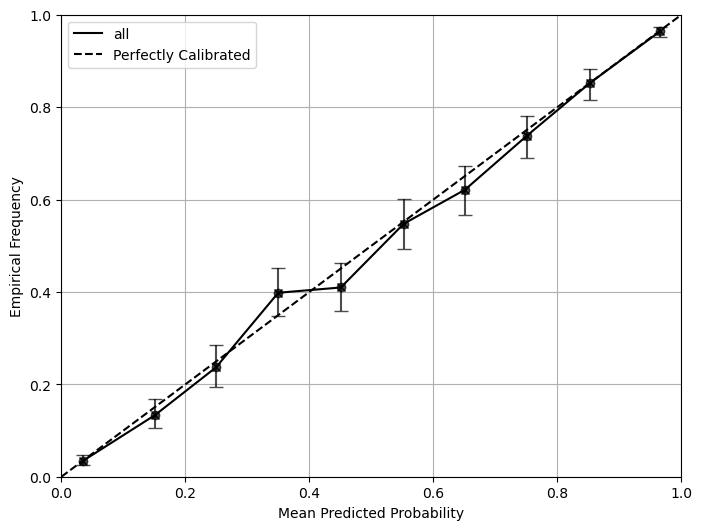
We use the CLI to compute the metrics and reliability diagram for the example dataset. The metrics and its 95% confidence interval will be printed and saved in a file. The reliability diagram will be saved in a separate file.
We can also test it on a miscalibrated dataset. The miscalibration is introduced by mutliply the log of probabilities by 2 and convert it back to probabilities.
[9]:
%run ../../../cal_metrics.py \
--csv_file '../../../example_data/simulated_misdata.csv' \
--metrics all \
--n_bootstrap 1000 \
--bootstrap_ci 0.95 \
--class_to_calculate 1 \
--num_bins 10 \
--save_metrics '../../../example_data/simulated_misdata_result.csv' \
--plot \
--plot_bins 10 \
--save_plot '../../../example_data/simulated_misdata_result.png' \
--verbose
Metrics with bootstrap confidence intervals:
SpiegelhalterZ score: 29.626 (26.37, 33.185)
SpiegelhalterZ p-value: 0. (0., 0.)
ECE-H topclass: 0.081 (0.073, 0.091)
ECE-H: 0.081 (0.073, 0.092)
MCE-H topclass: 0.151 (0.127, 0.202)
MCE-H: 0.168 (0.145, 0.244)
HL-H score: 1027.940 (818.524, 1292.977)
HL-H p-value: 0. (0., 0.)
ECE-C topclass: 0.079 (0.069, 0.09)
ECE-C: 0.08 (0.07, 0.091)
MCE-C topclass: 0.168 (0.141, 0.204)
MCE-C: 0.158 (0.139, 0.203)
HL-C score: 1857.584 (1355.637, 3341.319)
HL-C p-value: 0. (0., 0.)
COX coef: 0.497 (0.470, 0.524)
COX intercept: -0.045 (-0.125, 0.038)
COX coef lowerci: 0.469 (0.443, 0.494)
COX coef upperci: 0.526 (0.497, 0.554)
COX intercept lowerci: -0.123 (-0.203, -0.041)
COX intercept upperci: 0.034 (-0.046, 0.116)
COX ICI: 0.078 (0.071, 0.085)
Loess ICI: 0.074 (0.065, 0.083)
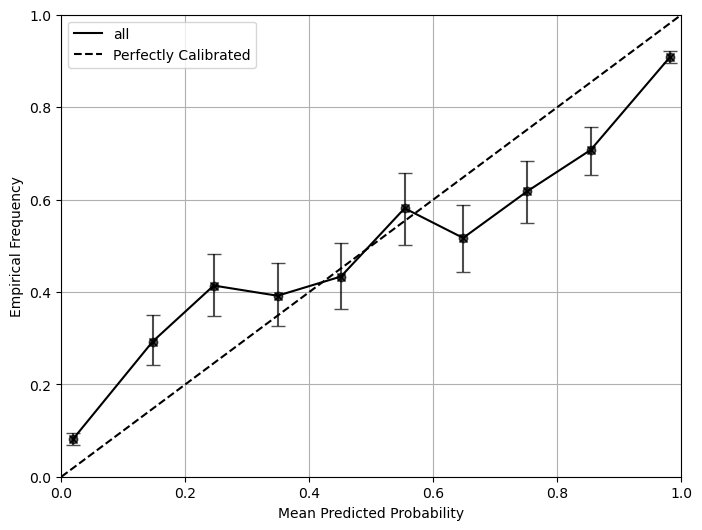
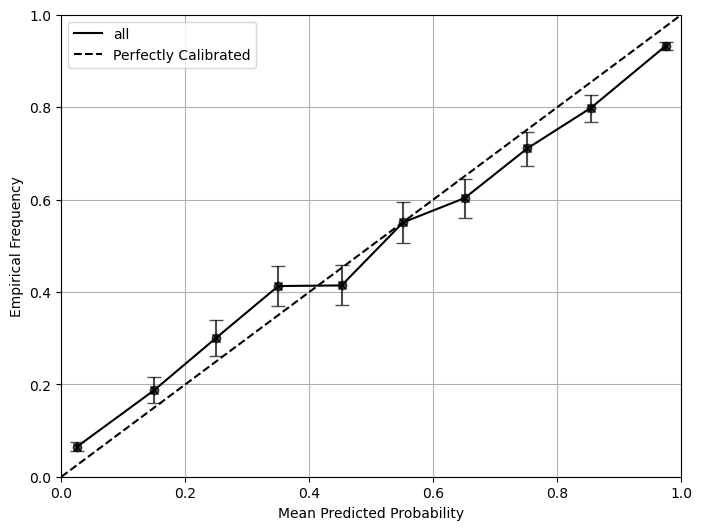
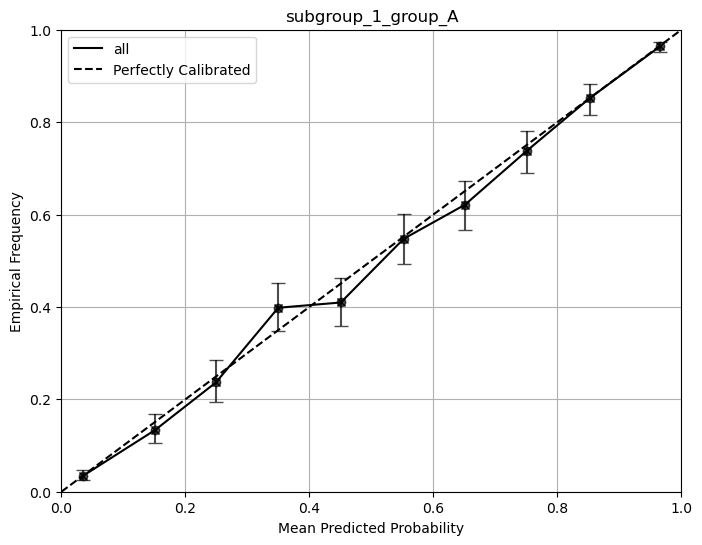
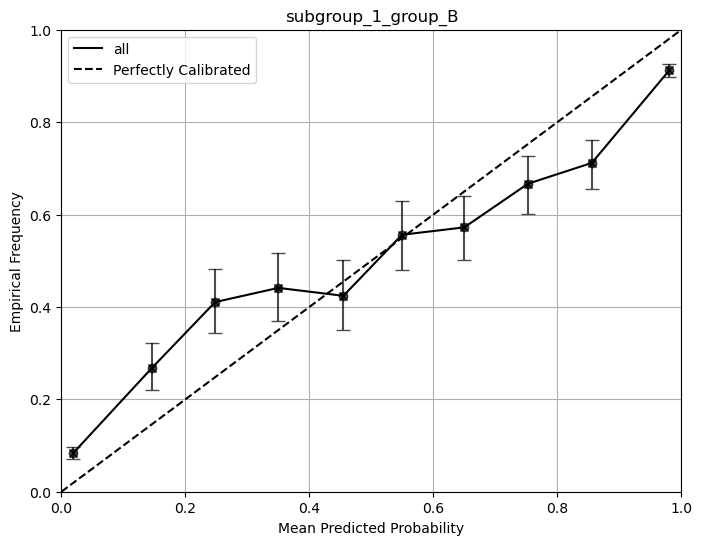
If your data has subgroups in it, simply run the script with the same argument as the one above. It will automatically detect the subgroup and generate the corresponding plots and metrics for each subgroup as well as the overall plot and metrics.
[10]:
%run ../../../cal_metrics.py \
--csv_file '../../../example_data/simulated_data_subgroup.csv' \
--metrics all \
--n_bootstrap 1000 \
--bootstrap_ci 0.95 \
--class_to_calculate 1 \
--num_bins 10 \
--save_metrics '../../../example_data/simulated_data_subgroup_result.csv' \
--plot \
--plot_bins 10 \
--save_plot '../../../example_data/simulated_data_subgroup_result.png' \
--verbose
Metrics with bootstrap confidence intervals:
SpiegelhalterZ score: 18.327 (15.794, 21.009)
SpiegelhalterZ p-value: 0. (0., 0.)
ECE-H topclass: 0.042 (0.035, 0.049)
ECE-H: 0.042 (0.036, 0.049)
MCE-H topclass: 0.055 (0.043, 0.087)
MCE-H: 0.063 (0.055, 0.109)
HL-H score: 429.732 (335.116, 584.729)
HL-H p-value: 0. (0., 0.)
ECE-C topclass: 0.042 (0.035, 0.049)
ECE-C: 0.038 (0.032, 0.046)
MCE-C topclass: 0.065 (0.055, 0.091)
MCE-C: 0.064 (0.052, 0.086)
HL-C score: 1138.842 (779.577, 1844.15)
HL-C p-value: 0. (0., 0.)
COX coef: 0.668 (0.638, 0.698)
COX intercept: -0.02 (-0.073, 0.03)
COX coef lowerci: 0.641 (0.611, 0.67)
COX coef upperci: 0.696 (0.664, 0.727)
COX intercept lowerci: -0.074 (-0.127, -0.025)
COX intercept upperci: 0.034 (-0.019, 0.084)
COX ICI: 0.049 (0.044, 0.055)
Loess ICI: 0.037 (0.032, 0.043)
Metrics for subgroup_1_group_A with bootstrap confidence intervals:
SpiegelhalterZ score: 0.376 (-1.536, 2.249)
SpiegelhalterZ p-value: 0.707 (0.018, 0.981)
ECE-H topclass: 0.01 (0.006, 0.021)
ECE-H: 0.012 (0.011, 0.025)
MCE-H topclass: 0.039 (0.017, 0.077)
MCE-H: 0.048 (0.034, 0.107)
HL-H score: 8.885 (7.273, 34.6)
HL-H p-value: 0.352 (0.000, 0.507)
ECE-C topclass: 0.009 (0.007, 0.022)
ECE-C: 0.009 (0.007, 0.023)
MCE-C topclass: 0.021 (0.018, 0.072)
MCE-C: 0.023 (0.018, 0.075)
HL-C score: 3.695 (4.463, 29.686)
HL-C p-value: 0.884 (0.000, 0.813)
COX coef: 0.994 (0.942, 1.050)
COX intercept: -0.045 (-0.135, 0.028)
COX coef lowerci: 0.937 (0.888, 0.990)
COX coef upperci: 1.051 (0.996, 1.111)
COX intercept lowerci: -0.123 (-0.214, -0.051)
COX intercept upperci: 0.034 (-0.056, 0.107)
COX ICI: 0.006 (0.001, 0.017)
Loess ICI: 0.006 (0.003, 0.016)
Metrics for subgroup_1_group_B with bootstrap confidence intervals:
SpiegelhalterZ score: 27.936 (24.631, 31.175)
SpiegelhalterZ p-value: 0. (0., 0.)
ECE-H topclass: 0.077 (0.068, 0.086)
ECE-H: 0.077 (0.069, 0.087)
MCE-H topclass: 0.133 (0.108, 0.175)
MCE-H: 0.163 (0.13, 0.232)
HL-H score: 910.439 (716.681, 1156.971)
HL-H p-value: 0. (0., 0.)
ECE-C topclass: 0.074 (0.066, 0.084)
ECE-C: 0.075 (0.065, 0.085)
MCE-C topclass: 0.141 (0.124, 0.182)
MCE-C: 0.140 (0.115, 0.182)
HL-C score: 2246.171 (1393.175, 3900.391)
HL-C p-value: 0. (0., 0.)
COX coef: 0.507 (0.481, 0.539)
COX intercept: 0.000 (-0.073, 0.077)
COX coef lowerci: 0.478 (0.454, 0.508)
COX coef upperci: 0.536 (0.508, 0.569)
COX intercept lowerci: -0.078 (-0.152, -0.002)
COX intercept upperci: 0.079 (0.005, 0.155)
COX ICI: 0.077 (0.07, 0.085)
Loess ICI: 0.07 (0.062, 0.078)
Using calzone in python
Instead of running the command line tool, you can also use calzone in python directly
[1]:
from calzone.metrics import CalibrationMetrics
from calzone.utils import data_loader

loader = data_loader('../../../example_data/simulated_welldata.csv')
cal_metrics = CalibrationMetrics(class_to_calculate=1)
cal_metrics.calculate_metrics(loader.labels, loader.probs, metrics='all')
[1]:
{'SpiegelhalterZ score': 0.3763269161877356,
 'SpiegelhalterZ p-value': 0.7066738713391099,
 'ECE-H topclass': 0.009608653731328977,
 'ECE-H': 0.01208775955804901,
 'MCE-H topclass': 0.03926468843081976,
 'MCE-H': 0.04848338618970194,
 'HL-H score': 8.884991559088098,
 'HL-H p-value': 0.35209071874348785,
 'ECE-C topclass': 0.009458033653818828,
 'ECE-C': 0.008733966945443138,
 'MCE-C topclass': 0.020515047600205505,
 'MCE-C': 0.02324031223486256,
 'HL-C score': 3.694947603203135,
 'HL-C p-value': 0.8835446575708198,
 'COX coef': 0.9942499557748269,
 'COX intercept': -0.04497652296600376,
 'COX coef lowerci': 0.9372902801721911,
 'COX coef upperci': 1.0512096313774626,
 'COX intercept lowerci': -0.12348577118577644,
 'COX intercept upperci': 0.03353272525376893,
 'COX ICI': 0.005610391483826338,
 'Loess ICI': 0.00558856942568957}